Word cloud
Word clouds (or tag clouds) help visualize weight or importance of individual words from a keyword list or a free-form text.
Loading required modules
Section titled “Loading required modules”Everything required to create word cloud are two amCharts 5 modules: “index” and “wordcloud”.
You can import those in your TypeScript / ES6 application as JavaScript modules:
import * as am5 from "@amcharts/amcharts5";import * as am5wc from "@amcharts/amcharts5/wc";For vanilla JavaScript applications and web pages, you can use “script” version:
<script src="https://cdn.amcharts.com/lib/5/index.js"></script><script src="https://cdn.amcharts.com/lib/5/wc.js"></script>WordCloud series
Section titled “WordCloud series”Word clouds are chart-less. This means that rather than creating a chart element, we start by creating a series.
Like everywhere else, we use its new() method to instantiate series, then push it children of a parent container.
If we are not intending to add any other controls (e.g. legend, or title) to the chart, we can push directly to root.container.children, or we can create a wrapper container as explained later on in this tutorial.
let series = root.container.children.push( am5wc.WordCloud.new(root, { text: "One two three. One two. One." }));var series = root.container.children.push( am5wc.WordCloud.new(root, { text: "One two three. One two. One." }));Setting words
Section titled “Setting words”There are two ways to set words to be displayed in the cloud:
- Providing a plain text.
- Providing a parsed list of words with their weight value.
Using plain text
Section titled “Using plain text”Setting the source text
Section titled “Setting the source text”If we have a text we need to analyze word frequency from, we can just set it as a text setting for the series:
let series = root.container.children.push( am5wc.WordCloud.new(root, { text: "One two three. One two. One." }));var series = root.container.children.push( am5wc.WordCloud.new(root, { text: "One two three. One two. One." }));Word cloud will parse text, and will auto-assign weight to each unique word based on its frequency in text.
Configuring word parser
Section titled “Configuring word parser”There are a few settings that text parser will take into account when generating list of words:
| Setting key | Default | Comment |
|---|---|---|
excludeWords |
- | An array of words we don’t want to appear in the word list. |
maxCount |
- | Maximum number of words in the final list. If there are more words than this settings, ones with the lowest weight (occurrence count) will be omitted. |
minValue |
- | The minimum number of occurrences for the word for it to be included in the list. |
minWordLength |
1 |
The minimum number of characters in a word for it to be included in the list. |
let series = root.container.children.push( am5wc.WordCloud.new(root, { excludeWords: ["the", "a", "an"], // words "the", "a", and "an" will not appear in cloud maxCount: 100, // the cloud will limited to 100 words minValue: 2, // only words that appear twice or more in sourceText will appear in the cloud minWordLength: 2, // words must be 2 characters in length or more text: sourceText }));var series = root.container.children.push( am5wc.WordCloud.new(root, { excludeWords: ["the", "a", "an"], // words "the", "a", and "an" will not appear in cloud maxCount: 100, // the cloud will limited to 100 words minValue: 2, // only words that appear twice or more in sourceText will appear in the cloud minWordLength: 2, // words must be 2 characters in length or more text: sourceText }));Using a word list
Section titled “Using a word list”We can also provide a list of words with their value (weight) as a series data:
series.data.setAll([ { category: "JavaScript", value: 64.96 }, { category: "HTML/CSS", value: 56.07 }, { category: "Python", value: 48.24 }, { category: "SQL", value: 47.08 }, { category: "Java", value: 35.35 }, { category: "Node.js", value: 33.91 }, { category: "TypeScript", value: 30.19 }]);series.data.setAll([ { category: "JavaScript", value: 64.96 }, { category: "HTML/CSS", value: 56.07 }, { category: "Python", value: 48.24 }, { category: "SQL", value: 47.08 }, { category: "Java", value: 35.35 }, { category: "Node.js", value: 33.91 }, { category: "TypeScript", value: 30.19 }]);If we use category key for word, and value for word weight, we don’t need to do anything else.
Otherwise we would also need to set up categoryField and valueField for our series:
let series = root.container.children.push(am5wc.WordCloud.new(root, {  categoryField: "tag",  valueField: "weight",}));
series.data.setAll([  { tag: "JavaScript", weight: 64.96 },  { tag: "HTML/CSS", weight: 56.07 },  { tag: "Python", weight: 48.24 },  { tag: "SQL", weight: 47.08 },  { tag: "Java", weight: 35.35 },  { tag: "Node.js", weight: 33.91 },  { tag: "TypeScript", weight: 30.19 }
]);
var series = root.container.children.push(am5wc.WordCloud.new(root, { categoryField: "tag", valueField: "weight",}));
series.data.setAll([ { tag: "JavaScript", weight: 64.96 }, { tag: "HTML/CSS", weight: 56.07 }, { tag: "Python", weight: 48.24 }, { tag: "SQL", weight: 47.08 }, { tag: "Java", weight: 35.35 }, { tag: "Node.js", weight: 33.91 }, { tag: "TypeScript", weight: 30.19 }
]);Configuring
Section titled “Configuring”Layout
Section titled “Layout”There is a number of settings that affect how words in the word cloud series are laid out.
Setting | Type | Default | Comment |
|---|---|---|---|
|
|
| The size of the smallest words. It can be set in pixels, or in When using percent value, it will take series width or height (whichever is smaller) as a reference point. |
|
|
| The size of the biggest words. It can be set in pixels, or in When using percent value, it will take series width or height (whichever is smaller) as a reference point. |
|
|
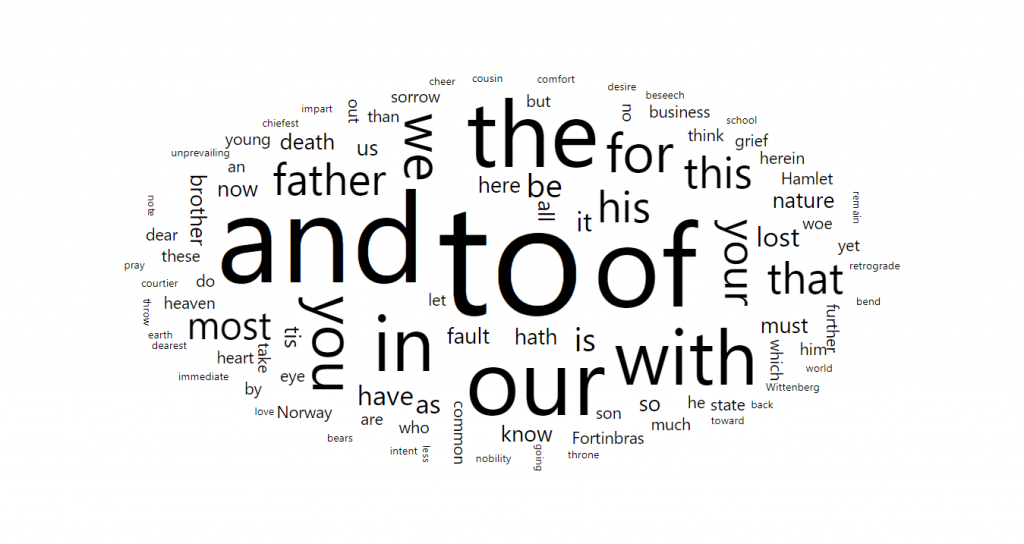
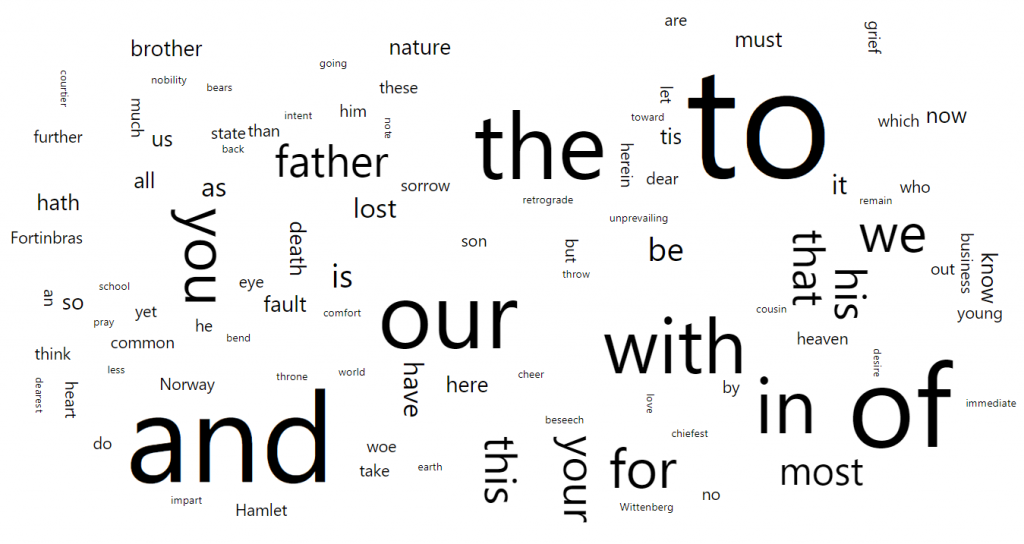
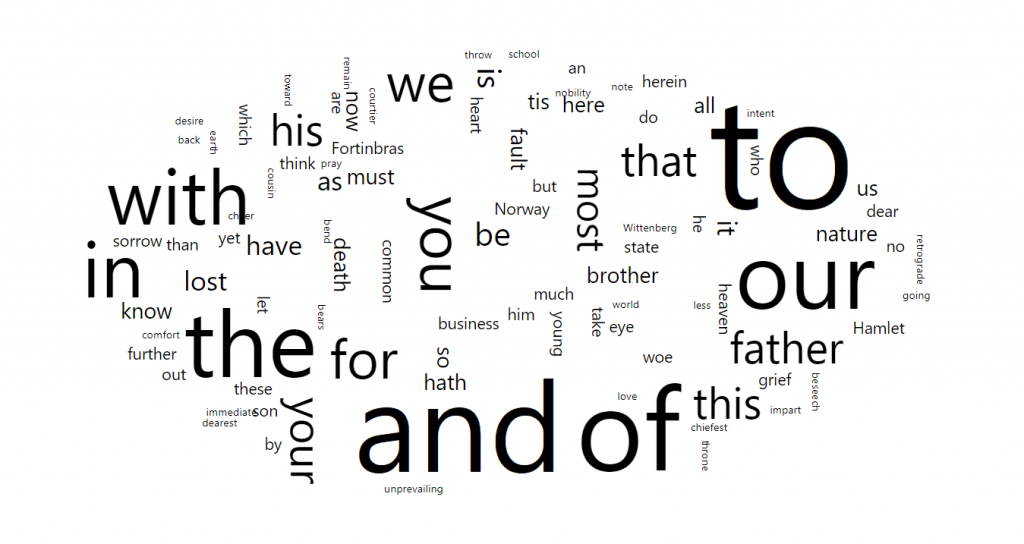
| How scattered words should be. Zero means no randomness - all biggest words will be concentrated in the middle with smallest on the outside.
|
|
|
| When |
Below figures show how randomness affects the layout of the cloud:
Rotation
Section titled “Rotation”Word cloud will alternate angle of words for a better fit. This will result in some words being horizontal, and some vertical.
Setting possible angles
Section titled “Setting possible angles”Series setting responsible for identifying possible angles is named angles.
It’s an array of numbers, and the default is [0, -90] meaning that words can come at zero (horizontal) or 90 (vertical) angle.
To make all words horizontal, set it to [0]. To make all vertical, use [90].
Normally, Word cloud will randomize the rotation for each word on every render. If we would like to always get consistent results, we can set randomizeAngles: false.
Rotating whole series
Section titled “Rotating whole series”Even though non-horizontal/vertical angles are not supported, the whole series can easily be rotated to achieve intermediate angle effect by rotation and relative centering settings to the series itself.
let series = root.container.children.push( am5wc.WordCloud.new(root, { rotation: -45, centerX: am5.percent(50), centerY: am5.percent(50), x: am5.percent(50), y: am5.percent(50) text: sourceText }));var series = root.container.children.push( am5wc.WordCloud.new(root, { rotation: -45, centerX: am5.percent(50), centerY: am5.percent(50), x: am5.percent(50), y: am5.percent(50) text: sourceText }));Using custom shapes
Section titled “Using custom shapes”The cloud can be arranged in any shape. For that, you need to set the svgPath setting, which accepts any SVG path value.
let series = root.container.children.push( am5wc.WordCloud.new(root, { text: sourceText, svgPath: "M 120 15 C 176 15 216 56 217 105 C 218 116 215 125 216 126 C 219 137 228 148 229 154 C 230 158 226 161 219 163 C 213 163 210 165 210 171 C 221 183 205 187 206 193 C 203 204 201 209 200 213 L 166 213 L 166 236 L 62 236 C 62 162 35 197 24 110 C 20 58 64 15 120 15 Z" }));var series = root.container.children.push( am5wc.WordCloud.new(root, { text: sourceText, svgPath: "M 120 15 C 176 15 216 56 217 105 C 218 116 215 125 216 126 C 219 137 228 148 229 154 C 230 158 226 161 219 163 C 213 163 210 165 210 171 C 221 183 205 187 206 193 C 203 204 201 209 200 213 L 166 213 L 166 236 L 62 236 C 62 162 35 197 24 110 C 20 58 64 15 120 15 Z" }));If we’d like to outline the shape itself, we can use the series.shape element:
series.shape.setAll({ strokeWidth: 10, nonScalingStroke: true, stroke: am5.color(0x000000)})series.shape.setAll({ strokeWidth: 10, nonScalingStroke: true, stroke: am5.color(0x000000)})Colors
Section titled “Colors”There is a number of ways to set colors to all words or each word individually.
Universal color
Section titled “Universal color”To set a color to be used universally for all words, simply set fill setting for the label template:
series.labels.template.setAll({ fontFamily: "Courier New", fill: am5.color(0x85FFC4)});series.labels.template.setAll({ fontFamily: "Courier New", fill: am5.color(0x85FFC4)});Via color set
Section titled “Via color set”Word cloud series can automatically assign a new color out of a color set.
To make it happen we just need to assign an instance of ColorSet to colors setting of the series:
let series = root.container.children.push( am5wc.WordCloud.new(root, { colors: am5.ColorSet.new(root, {}); text: sourceText }));var series = root.container.children.push( am5wc.WordCloud.new(root, { colors: am5.ColorSet.new(root, {}); text: sourceText }));Color set will use current theme when generating or using colors for each individual word.
We can even provide our own list:
let series = root.container.children.push( am5wc.WordCloud.new(root, { colors: am5.ColorSet.new(root, { colors: [ am5.color(0x095256), am5.color(0x087f8c), am5.color(0x5aaa95), am5.color(0x86a873), am5.color(0xbb9f06) ] }); text: sourceText }));var series = root.container.children.push( am5wc.WordCloud.new(root, { colors: am5.ColorSet.new(root, { colors: [ am5.color(0x095256), am5.color(0x087f8c), am5.color(0x5aaa95), am5.color(0x86a873), am5.color(0xbb9f06) ] }); text: sourceText }));Via data
Section titled “Via data”We can also use template fields to specify which field in data holds object with label’s setting values we want to override:
series.labels.template.setAll({  fontFamily: "Courier New",  templateField: "labelSettings"});
series.data.setAll([ { category: "JavaScript", value: 64.96, labelSettings: { fill: am5.color(0x85FFC4) } }, { category: "HTML/CSS", value: 56.07, labelSettings: { fill: am5.color(0x297373) } }, { category: "Python", value: 48.24, labelSettings: { fill: am5.color(0x946B49) } }, { category: "SQL", value: 47.08, labelSettings: { fill: am5.color(0xFF621F) } }, { category: "Java", value: 35.35, labelSettings: { fill: am5.color(0x39393A) } }]);series.labels.template.setAll({ fontFamily: "Courier New", templateField: "labelSettings"});
series.data.setAll([ { category: "JavaScript", value: 64.96, labelSettings: { fill: am5.color(0x85FFC4) } }, { category: "HTML/CSS", value: 56.07, labelSettings: { fill: am5.color(0x297373) } }, { category: "Python", value: 48.24, labelSettings: { fill: am5.color(0x946B49) } }, { category: "SQL", value: 47.08, labelSettings: { fill: am5.color(0xFF621F) } }, { category: "Java", value: 35.35, labelSettings: { fill: am5.color(0x39393A) } }]);Via heat rules
Section titled “Via heat rules”We can automatically assign a color (or any other label setting value) from a range based on its weight (value) using a heat rule.
let series = root.container.children.push(am5wc.WordCloud.new(root, {  calculateAggregates: true,  minFontSize: am5.percent(5),  maxFontSize: am5.percent(5),  text: sourceText}));
series.set("heatRules", [{  target: series.labels.template,  dataField: "value",  min: am5.color(0xFFB899),  max: am5.color(0xCC3D00),  key: "fill"}]);
var series = root.container.children.push(am5wc.WordCloud.new(root, { calculateAggregates: true, minFontSize: am5.percent(5), maxFontSize: am5.percent(5), text: sourceText}));
series.set("heatRules", [{ target: series.labels.template, dataField: "value", min: am5.color(0xFFB899), max: am5.color(0xCC3D00), key: "fill"}]);The above setup will make all words same size, but will apply different color based on their value.
Tooltips
Section titled “Tooltips”Labels in a word cloud can display a tooltip if we set tooltipText on label’s template:
series.labels.template.set("tooltipText", "{category}: [bold]{value}[/]");series.labels.template.set("tooltipText", "{category}: [bold]{value}[/]");Contents of the tooltip can include data placeholders (codes in curly brackets that will be replaced by actual data) and in-line formatting blocks (formatting instructions enclosed in square brackets).
Complete example
Section titled “Complete example”import * as am5 from "@amcharts/amcharts5";import * as am5wc from "@amcharts/amcharts5/wc";
// Create rootlet root = am5.Root.new("chartdiv");
// Create seriesvar wc = root.container.children.push(am5wc.WordCloud.new(root, { rotationThreshold: 0.7, maxCount: 200, minWordLength: 2, minFontSize: am5.percent(0.5), maxFontSize: am5.percent(30), text: "Though yet of Hamlet our dear brother's death The memory be green, and that it us befitted To bear our hearts in grief and our whole kingdom To be contracted in one brow of woe, Yet so far hath discretion fought with nature That we with wisest sorrow think on him, Together with remembrance of ourselves. Therefore our sometime sister, now our queen, The imperial jointress to this warlike state, Have we, as 'twere with a defeated joy,-- With an auspicious and a dropping eye, With mirth in funeral and with dirge in marriage, In equal scale weighing delight and dole,-- Taken to wife: nor have we herein barr'd Your better wisdoms, which have freely gone With this affair along. For all, our thanks. Now follows, that you know, young Fortinbras, Holding a weak supposal of our worth, Or thinking by our late dear brother's death Our state to be disjoint and out of frame, Colleagued with the dream of his advantage, He hath not fail'd to pester us with message, Importing the surrender of those lands Lost by his father, with all bonds of law, To our most valiant brother. So much for him. Now for ourself and for this time of meeting: Thus much the business is: we have here writ To Norway, uncle of young Fortinbras,-- Who, impotent and bed-rid, scarcely hears Of this his nephew's purpose,--to suppress His further gait herein; in that the levies, The lists and full proportions, are all made Out of his subject: and we here dispatch You, good Cornelius, and you, Voltimand, For bearers of this greeting to old Norway; Giving to you no further personal power To business with the king, more than the scope Of these delated articles allow. Farewell, and let your haste commend your duty. Tis sweet and commendable in your nature, Hamlet,To give these mourning duties to your father: But, you must know, your father lost a father; That father lost, lost his, and the survivor bound In filial obligation for some term To do obsequious sorrow: but to persever In obstinate condolement is a course Of impious stubbornness; 'tis unmanly grief; It shows a will most incorrect to heaven, A heart unfortified, a mind impatient, An understanding simple and unschool'd: For what we know must be and is as common As any the most vulgar thing to sense, Why should we in our peevish opposition Take it to heart? Fie! 'tis a fault to heaven, A fault against the dead, a fault to nature, To reason most absurd: whose common theme Is death of fathers, and who still hath cried, From the first corse till he that died to-day, 'This must be so.' We pray you, throw to earth This unprevailing woe, and think of us As of a father: for let the world take note, You are the most immediate to our throne; And with no less nobility of love Than that which dearest father bears his son, Do I impart toward you. For your intent In going back to school in Wittenberg, It is most retrograde to our desire: And we beseech you, bend you to remain Here, in the cheer and comfort of our eye, Our chiefest courtier, cousin, and our son."}));<script src="https://cdn.amcharts.com/lib/5/index.js"></script><script src="https://cdn.amcharts.com/lib/5/wc.js"></script>
<div id="chartdiv"></div>
<script>// Create rootvar root = am5.Root.new("chartdiv");
// Create seriesvar wc = root.container.children.push(am5wc.WordCloud.new(root, { maxCount: 200, minWordLength: 2, minFontSize: am5.percent(0.5), maxFontSize: am5.percent(30), text: "Though yet of Hamlet our dear brother's death The memory be green, and that it us befitted To bear our hearts in grief and our whole kingdom To be contracted in one brow of woe, Yet so far hath discretion fought with nature That we with wisest sorrow think on him, Together with remembrance of ourselves. Therefore our sometime sister, now our queen, The imperial jointress to this warlike state, Have we, as 'twere with a defeated joy,-- With an auspicious and a dropping eye, With mirth in funeral and with dirge in marriage, In equal scale weighing delight and dole,-- Taken to wife: nor have we herein barr'd Your better wisdoms, which have freely gone With this affair along. For all, our thanks. Now follows, that you know, young Fortinbras, Holding a weak supposal of our worth, Or thinking by our late dear brother's death Our state to be disjoint and out of frame, Colleagued with the dream of his advantage, He hath not fail'd to pester us with message, Importing the surrender of those lands Lost by his father, with all bonds of law, To our most valiant brother. So much for him. Now for ourself and for this time of meeting: Thus much the business is: we have here writ To Norway, uncle of young Fortinbras,-- Who, impotent and bed-rid, scarcely hears Of this his nephew's purpose,--to suppress His further gait herein; in that the levies, The lists and full proportions, are all made Out of his subject: and we here dispatch You, good Cornelius, and you, Voltimand, For bearers of this greeting to old Norway; Giving to you no further personal power To business with the king, more than the scope Of these delated articles allow. Farewell, and let your haste commend your duty. Tis sweet and commendable in your nature, Hamlet,To give these mourning duties to your father: But, you must know, your father lost a father; That father lost, lost his, and the survivor bound In filial obligation for some term To do obsequious sorrow: but to persever In obstinate condolement is a course Of impious stubbornness; 'tis unmanly grief; It shows a will most incorrect to heaven, A heart unfortified, a mind impatient, An understanding simple and unschool'd: For what we know must be and is as common As any the most vulgar thing to sense, Why should we in our peevish opposition Take it to heart? Fie! 'tis a fault to heaven, A fault against the dead, a fault to nature, To reason most absurd: whose common theme Is death of fathers, and who still hath cried, From the first corse till he that died to-day, 'This must be so.' We pray you, throw to earth This unprevailing woe, and think of us As of a father: for let the world take note, You are the most immediate to our throne; And with no less nobility of love Than that which dearest father bears his son, Do I impart toward you. For your intent In going back to school in Wittenberg, It is most retrograde to our desire: And we beseech you, bend you to remain Here, in the cheer and comfort of our eye, Our chiefest courtier, cousin, and our son.", // rotation: 45, // centerX: am5.percent(50), // centerY: am5.percent(50), // x: am5.percent(50), // y: am5.percent(50)}));</script>Additional controls
Section titled “Additional controls”Word cloud is a “container-less” chart. This means that there’s no wrapper “chart” element, that can be used to add series and external controls to.
If we don’t need anything else besides series, we can add it directly to the container of the root element.
However, if we need to add other elements, we’ll need to first create a “wrapper (or main) container”, we’ll be using add all the stuff (including the word cloud series) to:
let container = root.container.children.push(am5.Container.new(root, {  width: am5.percent(100),  height: am5.percent(100),  layout: root.verticalLayout}));
let series = root.container.children.push(  am5wc.WordCloud.new(root, {    text: "One two three. One two. One."  }));
var container = root.container.children.push(am5.Container.new(root, { width: am5.percent(100), height: am5.percent(100), layout: root.verticalLayout}));
var series = root.container.children.push( am5wc.WordCloud.new(root, { text: "One two three. One two. One." }));Chart title
Section titled “Chart title”Chart title can be added as a Label element child to the wrapper container:
let title = container.children.push(am5.Label.new(root, { text: "Most common programming languages", fontSize: 20, x: am5.percent(50), centerX: am5.percent(50)}));var title = container.children.push(am5.Label.new(root, { text: "Most common programming languages", fontSize: 20, x: am5.percent(50), centerX: am5.percent(50)}));Events
Section titled “Events”We can add events like click on label template:
series.labels.template.events.on("click", (ev: any) => { const category = ev.target.dataItem.get("category"); window.open("https://www.google.com/search?q=" + encodeURIComponent(category));});series.labels.template.events.on("click", (ev: any) => { const category = ev.target.dataItem.get("category"); window.open("https://www.google.com/search?q=" + encodeURIComponent(category));});The above will open a Google search with the clicked word.