

Titles on top of vertical (value) axis
Adding titles to axes is easy - just use axis’ title property. It will add a vertical or horizontal title next to axis depending on its position. However, you might want to place axis label directly on top of the vertical axis. This tutorial will show how.
Prerequisites
Section titled “Prerequisites”Containers
Section titled “Containers”This tutorial will refer to the concept of “containers”. This is a super powerful layouting mechanism in amCharts 4. Make sure you take a look at “Working with Containers” article for a better understanding how that stuff works.
Base chart
Section titled “Base chart”We’ve pre-created a basic, multi-value-axis chart with axis titles:
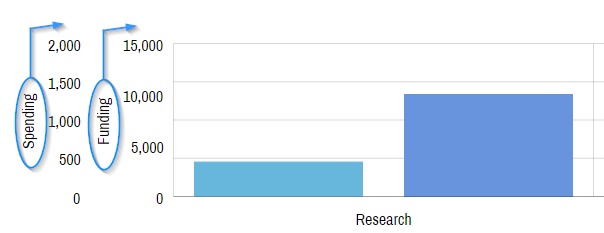
We have two value axes with titles, that, as you can see, take up a lot of extra space, and generally not look too nice.
Fixing titles
Section titled “Fixing titles”The task
Section titled “The task”Our target is: moving axis titles from left of the axis to the top. Naturally, they should also not be rotated.
The solution
Section titled “The solution”To achieve our task, we’ll need to go through some, uncomplicated tasks.
- Make some space on top of the chart for those labels, by setting chart’s
paddingTop. - Changing
layoutof the axes to"absolute", so that it does not try to arrange title and label elements in a row. - Disabling rotation of the label by setting its
rotation = 0. - Aligning the label using
alignandvalignattributes. - Fine-tuning label position using
dy.
Optionally, we’ll also tweak label appearance, making them bold by setting fontWeight as well as add some horizontal padding to the axes themselves.
The reason we outlined this in a stepped list, is that we’re about to drop a full code on ya:
// Add some spacing on topchart.paddingTop = 40;// ...let axis = chart.yAxes.push(new am4charts.ValueAxis());axis.renderer.grid.template.disabled = !showgrid;axis.paddingLeft = 10;axis.paddingRight = 10;axis.layout = "absolute";
// Set up axis titleaxis.title.text = "Something";axis.title.rotation = 0;axis.title.align = "center";axis.title.valign = "top";axis.title.dy = -40;axis.title.fontWeight = 600;
// Add some spacing on topchart.paddingTop = 40;// ...var axis = chart.yAxes.push(new am4charts.ValueAxis());axis.paddingLeft = 10;axis.paddingRight = 10;axis.layout = "absolute";
// Set up axis titleaxis.title.text = "Something";axis.title.rotation = 0;axis.title.align = "center";axis.title.valign = "top";axis.title.dy = -40;axis.title.fontWeight = 600;{ // ... "paddingTop": 40, "yAxes": [{ "paddingLeft": 10, "paddingRight": 10, "layout": "absolute", "title": { "text": "Something", "rotation": 0, "align": "center", "valign": "top", "dy": -40, "fontWeight": 600 } }]}Example
Section titled “Example”Here’s how it turned out, when we applied the above to our initial example: