Formatting Date & Time
Whenever a chart (or any other chart element) needs to format a date value, it turns to its DateFormatter (accesible via dateFormatter property) to do the actual formatting.
Setting date format
Section titled “Setting date format”As we saw in our introductory article about formatters, setting a date format is about setting dateFormat property of the respective DateFormatter object. Normally, you just use single DateFormatter for the whole chart (accessible via chart’s dateFormatter property). However, you give their own DateFormatters to just about any individual object in the chart.
/** * Set date format for the whole chart */chart.dateFormatter.dateFormat = "yyyy-MM-dd";
/** * Use separate DateFormatter for X axis, so we can set different format * (this presumes that X axis of type DateAxis was already created) */xAxis.dateFormatter = new am4core.DateFormatter();xAxis.dateFormatter.dateFormat = "MM-dd";
/** * Set date format for the whole chart */chart.dateFormatter.dateFormat = "yyyy-MM-dd";
/** * Use separate DateFormatter for X axis, so we can set different format * (this presumes that X axis of type DateAxis was already created) */xAxis.dateFormatter = new am4core.DateFormatter();xAxis.dateFormatter.dateFormat = "MM-dd";{ // ... // Set date format for the whole chart "dateFormatter": { "dateFormat": "yyyy-MM-dd" }
// ... // Use separate DateFormatter for X axis, so we can set different format "xAxes": [{ "type": "DateAxis", "dateFormatter": { "dateFormat": "MM-dd" } }]}Example
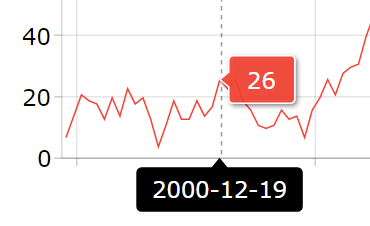
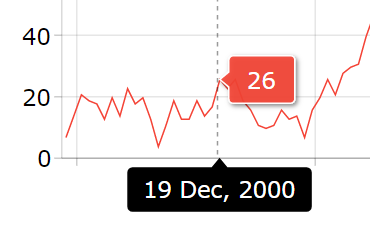
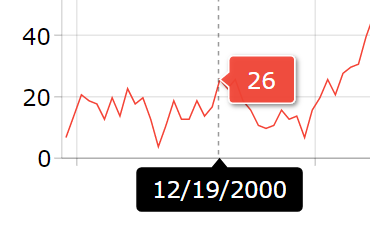
Section titled “Example”Below demonstrates how various dateFormat settings affect Chart Cursor’s tooltip contents on a Date Axis.
Format codes
Section titled “Format codes”These codes will be replaced with the corresponding value.
Field | Sym. | No. | Example | Description |
|---|---|---|---|---|
era | G | 1 | AD | Era - Replaced with the Era string for the current date. |
year | y | 1..n | 1996 | Year |
Y | 1..n | 1997 | Year (of “Week of Year”), used in ISO year-week calendar. May differ from calendar year. | |
u | 1..n | 4601 | Extended year. This is a single number designating the year of this calendar system, encompassing all supra-year fields. For example, for the Julian calendar system, year numbers are positive, with an era of BCE or CE. An extended year value for the Julian calendar system assigns positive values to CE years and negative values to BCE years, with 1 BCE being year 0. | |
quarter | q | 1 | 3 | Calendar quarter of the year starting from January. |
month | M | 1..2 | 09 | Month - Use one or two for the numerical month, three for the abbreviation, or four for the full name, or 5 for the narrow name. Deviation from standard The 3-character code calls for a 4-character month names in Unicode standard. Since it’s universally common to use 3-character abbreviations, amCharts deviates from the standard here. |
3 | Sep | |||
4 | September | |||
5 | S | |||
week | w | 1..2 | 27 | Week of Year. |
W | 1 | 3 | Week of Month | |
day | d | 1..2 | 1 | Date - Day of the month |
D | 1..3 | 345 | Day of year | |
F | 1 | 2 | Day of Week in Month. The example is for the 2nd Wed in July. | |
g | 1..n | 2451334 | Modified Julian day. This is different from the conventional Julian day number in two regards. First, it demarcates days at local zone midnight, rather than noon GMT. Second, it is a local number; that is, it depends on the local time zone. It can be thought of as a single number that encompasses all the date-related fields. | |
t | 1 | st | Day ordinal: “st”, “nd”, “rd”. | |
weekday | E | 1..2 | 3 | Day of week - Use three for the short day, or four for the full name, or 5 for the narrow name. Deviation from standard 3-character code should result in 4-letter abbreviation. However the 3-letter abbreviation is more common, so we’re using it, instead of the one listed in standard. Sunday is 7, not 1 as per Unicode standard. |
3 | Tues | |||
4 | Tuesday | |||
5 | T | |||
e | 1..2 | 2 | Local day of week. Same as E except numeric value will depend on the local starting day of the week. For this example, Monday is the first day of the week. | |
3 | Tues | |||
4 | Tuesday | |||
5 | T | |||
period | a | 1 | AM | AM or PM |
a | 2 | A.M. | A.M. or P.M. | |
a | 3 | A | A or P | |
hour | h | 1..2 | 11 | Hour [1-12]. |
H | 1..2 | 13 | Hour [0-23]. | |
K | 1..2 | 0 | Hour [0-11]. | |
k | 1..2 | 24 | Hour [1-24]. | |
minute | m | 1..2 | 59 | Minute. Use one or two for zero padding. |
second | s | 1..2 | 12 | Second. Use one or two for zero padding. |
S | 1..n | 3456 | Fractional Second - rounds to the count of letters. (example is for 12.34567) | |
A | 1..n | 69540000 | Milliseconds in day. This field behaves exactly like a composite of all time-related fields, not including the zone fields. As such, it also reflects discontinuities of those fields on DST transition days. On a day of DST onset, it will jump forward. On a day of DST cessation, it will jump backward. This reflects the fact that is must be combined with the offset field to obtain a unique local time value. | |
x | 1 | 1507908460868 | Milliseconds since 1970-01-01 / “Unix epoch” – a timestamp. | |
n | 1..3 | 029 | Milliseconds. Use one to three for zero padding. This is similar to “S” except number of letters determine padding of numbers instead of rounding. | |
zone | z | 1 | PT | Timezone. Use 1 for short wall (generic) time, 2 for long wall time, 3 for the short timezone (i.e. PST) or 4 for the full name (Pacific Standard Time). If there’s no name for the zone, fallbacks may be used, depending on available data. |
2 | Pacific Time | |||
3 | PDT | |||
4 | Pacific Daylight Time | |||
Z | 1 | GMT-08:00 | Use 1 for GMT format, 2 for RFC 822 | |
2 | -0800 | |||
special formats | i | 1 | 2017-10-14T05:24:17.872Z | Date/time formatted according to ISO8601 format. |
I | 1 | Sat, 14 Oct 2017 05:21:51 GMT | Date/time formatted to a string representation using UTC time zone according to RFC-1123 specification. |
Using Intl object formats
Section titled “Using Intl object formats”Date formats can be specified using JavaScript’s built-in Intl object. Please refer to “Formatting date/time and numbers using “Intl” object” for further information.
Styling output
Section titled “Styling output”DateFormatter will respect bracketed style formats. E.g.:
[bold red]yyyy-MM-dd
Read more about styling strings in “Formatting Strings”.
Overriding format
Section titled “Overriding format”As we saw in our introductory article on Formatters, you can override global or local dateFormat with a TextFormatter data field function formatDate().
series.tooltipText = "{dateX.formatDate('yyyy-mm')}: {valueY.formatNumber('#.00')}";series.tooltipText = "{dateX.formatDate('yyyy-mm')}: {valueY.formatNumber('#.00')}";"series": [{ // ... "tooltipText": "{dateX.formatDate('yyyy-mm')}: {valueY.formatNumber('#.00')}"]}Parsing dates
Section titled “Parsing dates”amCharts DateFormatter can parse string-based dates according to supplied format. Parsing format uses a subset of the available formatting codes.
When chart parses externally loaded data, or even if you set the date-based data directly to the chart, but use strings or integer timestamps instead of full-fledged Date objects chart expects, it will use its dateFormatter to parse those into dates.
When parsing dates, DateFormatter will use the format set in its inputDateFormat property, rather that dateFormat. This allows have different input and output formats.
Below is the list of codes that are supported in parsing:
Field | Sym. | No. | Example |
|---|---|---|---|
era | G | 1 | AD |
year | y | 1..n | 1996 |
Y | 1..n | 1997 | |
month | M | 1..2 | 09 |
3 | Sep | ||
4 | September | ||
week | w | 1..2 | 27 |
W | 1 | 3 | |
day | d | 1..2 | 1 |
D | 1..3 | 345 | |
period | a | 1 | AM |
a | 2 | A.M. | |
a | 3 | A | |
hour | h | 1..2 | 11 |
H | 1..2 | 13 | |
K | 1..2 | 0 | |
k | 1..2 | 24 | |
minute | m | 1..2 | 59 |
second | s | 1..2 | 12 |
S | 1..n | 3456 | |
x | 1 | 1507908460868 | |
n | 1..3 | 029 | |
zone | Z | 1 | GMT-08:00 |
2 | -0800 | ||
special formats | i | 1 | 2017-10-14T05:24:17.872Z |
Escaping
Section titled “Escaping”Quotes
Section titled “Quotes”To explicitly make formatter ignore a portion of text, enclose it within single quotes:
yyyy.MM.dd G 'at' HH:mm:ss zzz
The "at" above will not be parsed when being processed by DateFormatter. It will be left as is:
2016.09.21 AD at 19:18:01 GMT+3
Any text enclosed in single quotes will be displayed as is, without applying formatting to it.
To use a single quote (either within quoted text or outside it) add single quote twice:
HH:mm:ss 'o''clock'
Will result in:
19:18:01 o'clock
Square and curly brackets
Section titled “Square and curly brackets”Square and curly brackets have special meaning in formatting text labels as well.
Please refer to the “Formatting Strings” article for more info.
Locale & translations
Section titled “Locale & translations”The language-specific codes like months, weekdays, am/pm indicator and date ordinals are translatable in language files.
Date ordinals are complex and vary greatly across languages. The translation comes in a form of a custom function.
Please refer to article “Locales” for more details about chart translations and locale settings.
Date/time formatting in charts
Section titled “Date/time formatting in charts”Please refer to “Formatting date and time” section in “Date Axis” article, for info and examples, of how formatters are used on a Date axis.