Round tooltips
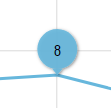
Normally, tooltips in charts take square shape to match the content within. This quick tutorial will show how to configure Tooltip object to resemble a round fixed-radius shape.
Base chart
Section titled “Base chart”We’re going to start off with a basic chart that has one line series, a cursor and regular tooltips enabled:
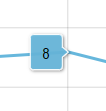
As you can see it displays a square, variable width tooltip to the side of the data item currently being hovered:
Making tooltip round
Section titled “Making tooltip round”We’re now going to go ahead and give our tooltip a complete makeover.
For that we’re going to take the following steps:
- Round the corners for tooltip to the size of our target circle:
series.tooltip.background.cornerRadius = 20 - Disable outline so that pointer does not look like it’s cut off from the tooltip body by rounded corners:
series.tooltip.background.strokeOpacity = 0 - Change the orientation for the tooltip to vertical:
series.tooltip.pointerOrientation = "vertical" - Set minimum dimensions for the label in our tooltip:
series.tooltip.label.minWidth = 40
series.tooltip.label.minHeight = 40 - Align the label text so it’s right in the center:
series.tooltip.label.textAlign = "middle"
series.tooltip.label.textValign = "middle"
Complete code:
series.tooltipText = "{value}";series.tooltip.background.cornerRadius = 20;series.tooltip.background.strokeOpacity = 0;series.tooltip.pointerOrientation = "vertical";series.tooltip.label.minWidth = 40;series.tooltip.label.minHeight = 40;series.tooltip.label.textAlign = "middle";series.tooltip.label.textValign = "middle";series.tooltipText = "{value}";series.tooltip.background.cornerRadius = 20;series.tooltip.background.strokeOpacity = 0;series.tooltip.pointerOrientation = "vertical";series.tooltip.label.minWidth = 40;series.tooltip.label.minHeight = 40;series.tooltip.label.textAlign = "middle";series.tooltip.label.textValign = "middle";{ // ... "series": [{ "type": "LineSeries", // ... "tooltipText": "{value}", "pointerOrientation": "vertical", "tooltip": { "background": { "cornerRadius": 20, "strokeOpacity": 0 }, "label": { "minWidth": 40, "minHeight": 40, "textAlign": "middle", "textValign": "middle" } } }]}This should result in tooltip looking like this: