

Maps with separator lines
Some maps, bundled with amCharts 4, such as “U.S. territories” come with built-in separator lines. This tutorial will explain how to enable and configure them.
Maps with separators
Section titled “Maps with separators”GeoJSON format, which we use for our maps, allows including not only areas (polygons), but also line information. They may be used for a variety of reasons, i.e. separating displaced polygons, indicating that they were deliberately moved for aesthetic purposes.
The most notable example is a variety of distorted U.S. maps with some of the island states and territories displayed below the mainland map:
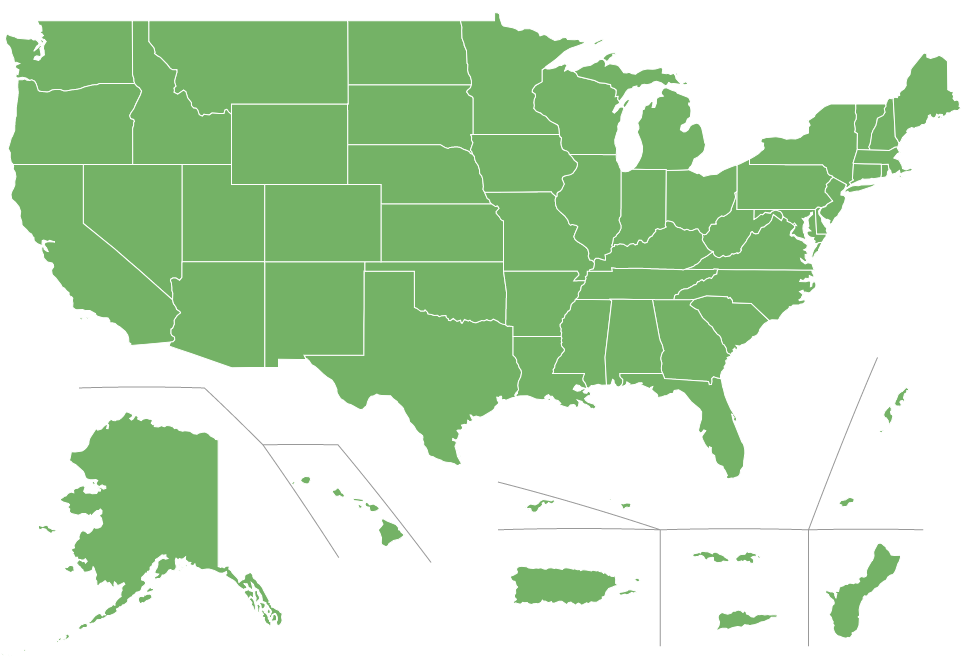
At this time we have two maps that have separators embedded:
- usaTerritories
- usaTerritories2
Let’s try creating a simple map with usaTerritories.
All the territory polygons appear, but… “look ma, no separators”!
Enabling separator lines
Section titled “Enabling separator lines”Separator lines are (shocker) not polygons. They are lines, hence they do not appear as part of the MapPolygonSeries.
To enable those lines, we will need to create another series - MapLineSeries.
let separatorSeries = chart.series.push(new am4maps.MapLineSeries());separatorSeries.useGeodata = true;var separatorSeries = chart.series.push(new am4maps.MapLineSeries());separatorSeries.useGeodata = true;{ // ... "series": [{ "type": "MapPolygonSeries", // ... }, { "type": "MapLineSeries", "useGeodata": true }]}Let’s see how our map looks now.
There they are.
Configuring separators
Section titled “Configuring separators”Final step in our short tutorial is learning how to configure our separators.
Technically, separators are just like any other line series. So you can configure them using mapLines.template.
Let’s just see how we can easily change color of the lines.
separatorSeries.mapLines.template.stroke = am4core.color("#999");separatorSeries.mapLines.template.stroke = am4core.color("#999");{ // ... "series": [{ "type": "MapPolygonSeries", // ... }, { "type": "MapLineSeries", "useGeodata": true, "mapLines": { "stroke": "#999" } }]}