

Map with Orthographic (globe) projection
This short tutorial will show how you can create a Globe out of your map using Orthographic projection.
Setting projection
Section titled “Setting projection”As you may already know, each map can be displayed in a number of ways - projections. (more about it here)
Each one has it’s own advantages and disadvantages. However, only one can be used to create a Globe-like representation of the world - Orthographic.
To set this projection we use map’s projection property:
chart.projection = new am4maps.projections.Orthographic();chart.projection = new am4maps.projections.Orthographic();{ // ... "projection": "Orthographic", // ...}This alone is enough to convert your regular flat map into a globe!
Setting globe rotation
Section titled “Setting globe rotation”Normally, the our newly created globe will have its zero longitude in the middle.
You can set the initial start position using deltaLongitude setting.
It works by adjusting the middle one way or another by longitude degrees.
chart.deltaLongitude = -60;chart.deltaLongitude = -60;{ // ... "deltaLongitude": -60, // ...}Globe background
Section titled “Globe background”A globe with curved countries “in the air” looks kinda weird. To make it look more like a real globe, let’s add a fill, or rather “background series”.
The whole process is described in great detail in “Background series”. We’re just going to repeat the code here for our convenience.
chart.backgroundSeries.mapPolygons.template.polygon.fill = am4core.color("#aadaff");chart.backgroundSeries.mapPolygons.template.polygon.fillOpacity = 1;chart.backgroundSeries.mapPolygons.template.polygon.fill = am4core.color("#aadaff");chart.backgroundSeries.mapPolygons.template.polygon.fillOpacity = 1;{ // ... "backgroundSeries": { "mapPolygons": { "polygon": { "fill": "#aadaff", "fillOpacity": 1 } } }}Map grid
Section titled “Map grid”OK, just one last enhancement: map grid. It will give our map an event more “globy” effect.
Again, check out “Map grid” in main Map Chart article for a thorough guidance. We’re just leave you with a TL/DR; version.
var graticuleSeries = chart.series.push(new am4maps.GraticuleSeries());graticuleSeries.mapLines.template.line.stroke = am4core.color("#67b7dc");graticuleSeries.mapLines.template.line.strokeOpacity = 0.2;graticuleSeries.fitExtent = false;var graticuleSeries = chart.series.push(new am4maps.GraticuleSeries());graticuleSeries.mapLines.template.line.stroke = am4core.color("#67b7dc");graticuleSeries.mapLines.template.line.strokeOpacity = 0.2;graticuleSeries.fitExtent = false;{ // ... "series": [{ // ... }, { "type": "GraticuleSeries", "zIndex": -1, "fitExtent": false, "mapLines": { "line": { "stroke": "#67b7dc", "strokeOpacity": 0.2 } } }]}The demo
Section titled “The demo”We’ve fitted the following demo with a slider, to see how changing deltaLongitude affects our globe:
User interactions
Section titled “User interactions”Map Chart allows configuring the globe to rotate instead of moving when using mouse or touch, using its panBehavior property.
And, here’s another demo that shows rotation of the globe by dragging the map itself:
Map line series
Section titled “Map line series”Before you go, let’s talk about Map line series.
Using lines on the map in Orthographic projection presents certain challenges, because line might start and end on the “invisible” side of the globe: one’s that facing away from viewer.
Images that are “out of the view” will be automatically hidden, but what about lines?
We’d expect them to be shown and be cut off when they cross the threshold of the “horizon”.
The truth is that only MapLineSeries support this functionality, and only when shortestDistance = true (default setting).
Other line series like MapArcSeries and MapSplineSeries are not supported.
Consider a multi-point line that goes from Paris to Mexico City, then continues to Honolulu. This is how using different map line series will look like:
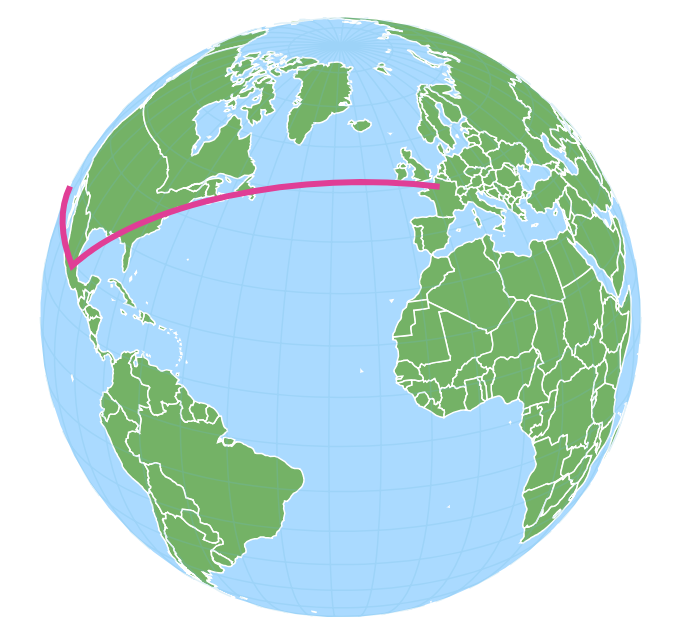
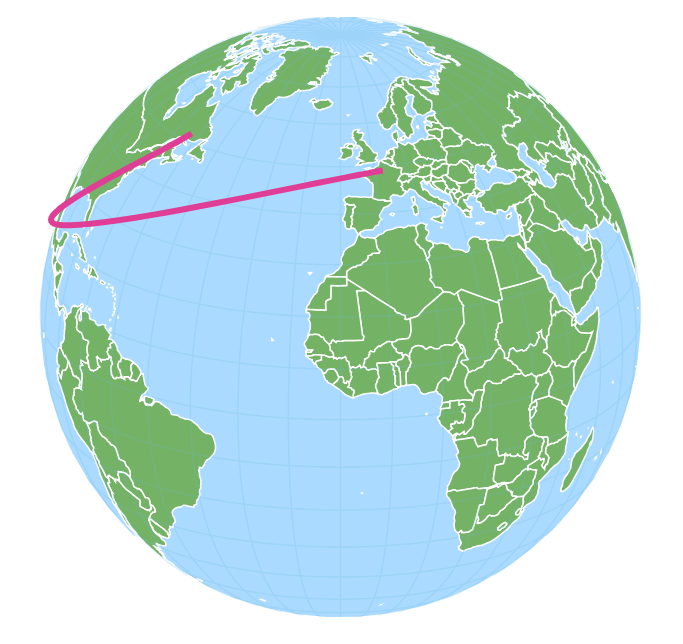
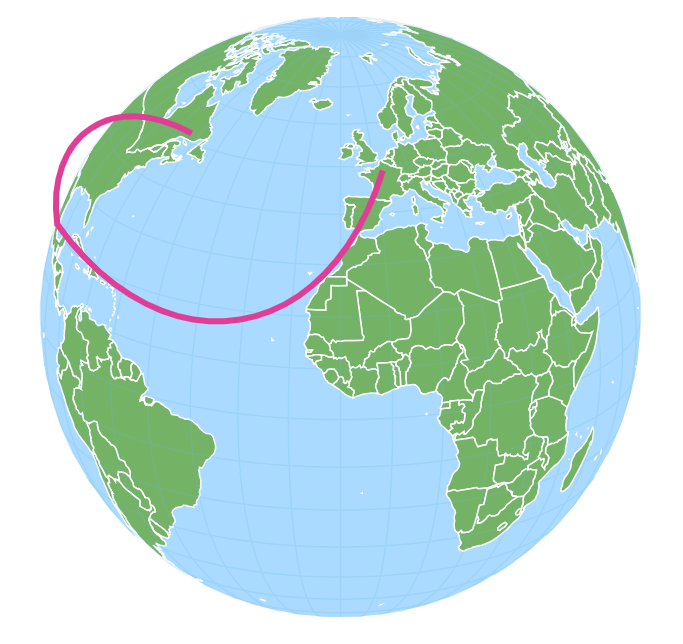
All line types produce correct result in that they reach their target coordinates. However only MapLineSeries ar being correctly cut off at the “horizon”.