

Map heat legend with real start/end value labels
A Heat legend uses regular axis to display value range/scale. For narrower setups it might mean that there are not real start/end labels. This tutorial will show how to remedy that.
Problem
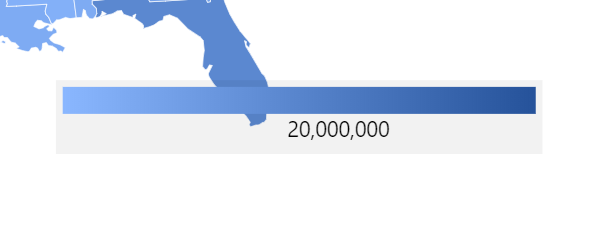
Section titled “Problem”HeatLegend uses real ValueAxis to display value labels. Value axis come with its certain logic how labels are spaced, positioned, and rounded to “pretty” numbers.
In some cases that might result in oddly looking legend:
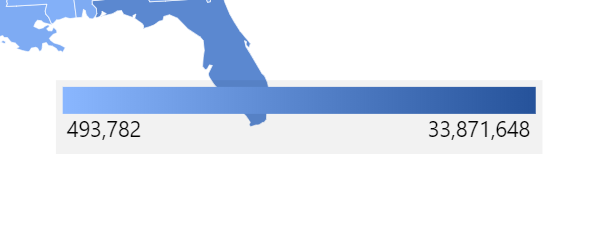
Let’s see how we can achieve that.
Solution
Section titled “Solution”Disabling automatic labels
Section titled “Disabling automatic labels”First of all, we need to get rid of the automatically-calculate labels.
For that we can set up an “adapter” to return empty text:
heatLegend.valueAxis.renderer.labels.template.adapter.add("text", function(labelText) { return "";});heatLegend.valueAxis.renderer.labels.template.adapter.add("text", function(labelText) { return "";});{ // ... "children": [{ "type": "HeatLegend", "forceCreate": true, "id": "heatLegend", // ... "valueAxis": { "renderer": { "labels": { "adapter": { "text": function(labelText) { return ""; } } } } } }}Adding fixed labels
Section titled “Adding fixed labels”We are now going to add two labels (in form of “axis ranges”): one for lowest value, the other for highest.
For now we are not going to set their values or text. We’ll get to that later. Empty labels for now.
let minRange = heatLegend.valueAxis.axisRanges.create();minRange.label.horizontalCenter = "left";
let maxRange = heatLegend.valueAxis.axisRanges.create();maxRange.label.horizontalCenter = "right";var minRange = heatLegend.valueAxis.axisRanges.create();minRange.label.horizontalCenter = "left";
var maxRange = heatLegend.valueAxis.axisRanges.create();maxRange.label.horizontalCenter = "right";{ // ... "children": [{ "type": "HeatLegend", "forceCreate": true, "id": "heatLegend", // ... "valueAxis": { // … "axisRanges": [{ "label": { "horizontalCenter": "left" }, "label": { "horizontalCenter": "right" } }] } }}Populating labels
Section titled “Populating labels”All we have now left to do is to populate those labels with real values.
Since we need our data parsed and ready before we can know those min and max values, we’re going to be using "datavalidated" event on our polygon series.
polygonSeries.events.on("datavalidated", function(ev) {  let heatLegend = ev.target.map.getKey("heatLegend");
  let min = heatLegend.series.dataItem.values.value.low;  let minRange = heatLegend.valueAxis.axisRanges.getIndex(0);  minRange.value = min;  minRange.label.text = "" + heatLegend.numberFormatter.format(min);
let max = heatLegend.series.dataItem.values.value.high; let maxRange = heatLegend.valueAxis.axisRanges.getIndex(1); maxRange.value = max; maxRange.label.text = "" + heatLegend.numberFormatter.format(max);});polygonSeries.events.on("datavalidated", function(ev) { var heatLegend = ev.target.map.getKey("heatLegend");
var min = heatLegend.series.dataItem.values.value.low; var minRange = heatLegend.valueAxis.axisRanges.getIndex(0); minRange.value = min; minRange.label.text = "" + heatLegend.numberFormatter.format(min);
var max = heatLegend.series.dataItem.values.value.high; var maxRange = heatLegend.valueAxis.axisRanges.getIndex(1); maxRange.value = max; maxRange.label.text = "" + heatLegend.numberFormatter.format(max);});{ // ... "series": [{ // ... "events": { // ... "datavalidated": function(ev) { var heatLegend = ev.target.map.getKey("heatLegend");
var min = heatLegend.series.dataItem.values.value.low; var minRange = heatLegend.valueAxis.axisRanges.getIndex(0); minRange.value = min; minRange.label.text = "" + heatLegend.numberFormatter.format(min);
var max = heatLegend.series.dataItem.values.value.high; var maxRange = heatLegend.valueAxis.axisRanges.getIndex(1); maxRange.value = max; maxRange.label.text = "" + heatLegend.numberFormatter.format(max); } } }]}Full code
Section titled “Full code”// Set up heat legendlet heatLegend = chart.createChild(am4maps.HeatLegend);heatLegend.id = "heatLegend";heatLegend.series = polygonSeries;heatLegend.align = "right";heatLegend.valign = "bottom";heatLegend.width = am4core.percent(35);heatLegend.marginRight = am4core.percent(4);heatLegend.background.fill = am4core.color("#000");heatLegend.background.fillOpacity = 0.05;heatLegend.padding(5, 5, 5, 5);
// Set up custom heat map legend labels using axis rangeslet minRange = heatLegend.valueAxis.axisRanges.create();minRange.label.horizontalCenter = "left";
let maxRange = heatLegend.valueAxis.axisRanges.create();maxRange.label.horizontalCenter = "right";
// Blank out internal heat legend value axis labelsheatLegend.valueAxis.renderer.labels.template.adapter.add("text", function(labelText) { return "";});
// Update heat legend value labelspolygonSeries.events.on("datavalidated", function(ev) { let heatLegend = ev.target.map.getKey("heatLegend");
let min = heatLegend.series.dataItem.values.value.low; let minRange = heatLegend.valueAxis.axisRanges.getIndex(0); minRange.value = min; minRange.label.text = "" + heatLegend.numberFormatter.format(min);
let max = heatLegend.series.dataItem.values.value.high; let maxRange = heatLegend.valueAxis.axisRanges.getIndex(1); maxRange.value = max; maxRange.label.text = "" + heatLegend.numberFormatter.format(max);});// Set up heat legendvar heatLegend = chart.createChild(am4maps.HeatLegend);heatLegend.id = "heatLegend";heatLegend.series = polygonSeries;heatLegend.align = "right";heatLegend.valign = "bottom";heatLegend.width = am4core.percent(35);heatLegend.marginRight = am4core.percent(4);heatLegend.background.fill = am4core.color("#000");heatLegend.background.fillOpacity = 0.05;heatLegend.padding(5, 5, 5, 5);
// Set up custom heat map legend labels using axis rangesvar minRange = heatLegend.valueAxis.axisRanges.create();minRange.label.horizontalCenter = "left";
var maxRange = heatLegend.valueAxis.axisRanges.create();maxRange.label.horizontalCenter = "right";
// Blank out internal heat legend value axis labelsheatLegend.valueAxis.renderer.labels.template.adapter.add("text", function(labelText) { return "";});
// Update heat legend value labelspolygonSeries.events.on("datavalidated", function(ev) { var heatLegend = ev.target.map.getKey("heatLegend");
var min = heatLegend.series.dataItem.values.value.low; var minRange = heatLegend.valueAxis.axisRanges.getIndex(0); minRange.value = min; minRange.label.text = "" + heatLegend.numberFormatter.format(min);
var max = heatLegend.series.dataItem.values.value.high; var maxRange = heatLegend.valueAxis.axisRanges.getIndex(1); maxRange.value = max; maxRange.label.text = "" + heatLegend.numberFormatter.format(max);});{ // ... "series": [{ // ... "events": { "datavalidated": function(ev) { var heatLegend = ev.target.map.getKey("heatLegend");
var min = heatLegend.series.dataItem.values.value.low; var minRange = heatLegend.valueAxis.axisRanges.getIndex(0); minRange.value = min; minRange.label.text = "" + heatLegend.numberFormatter.format(min);
var max = heatLegend.series.dataItem.values.value.high; var maxRange = heatLegend.valueAxis.axisRanges.getIndex(1); maxRange.value = max; maxRange.label.text = "" + heatLegend.numberFormatter.format(max); } } }], "children": [{ "type": "HeatLegend", "forceCreate": true, "id": "heatLegend", "align": "right", "valign": "bottom", "width": "35%", "marginRight": "4%", "paddingTop": 5, "paddingRight": 5, "paddingBottom": 5, "paddingLeft": 5, "background": { "fill": "#000", "fillOpacity": 0.05 } "valueAxis": { "renderer": { "labels": { "adapter": { "text": function(labelText) { return ""; } } } }, "axisRanges": [{ "label": { "horizontalCenter": "left" }, "label": { "horizontalCenter": "right" } }] } }}