

Loading external data in Live Editor
It is possible to use Data Loader with Live Editor. I say “technically” because there are some caveats, which I will outline a bit later.
First, to enable Data Loader, click on the Extra Config checkbox to enable plugin settings.
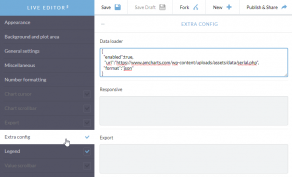
Then, type in Data Loader config into appropriate box. I.e.:
{ "enabled":true, "url":"https://www.mysite.com/data.php", "format":"json"}That’s it. When Editor detects Data Loader active, it will hide the Data tab and will attempt loading your external data.
Now onto caveats I mentioned.
-
The Editor is under SSL (https://) which means that the URL for your data source should be as well. The browser will prevent loading of non-SSL resources on an SSL-enabled page.
-
You will need to ensure that your web server, which serves the data has appropriate cross-origin HTTP request (CORS) settings, to allow load requests from Live Editor.
Here’s more information about CORS.
And, just in case you were wondering, here’s a real Live Editor chart using Data Loader and external data.